

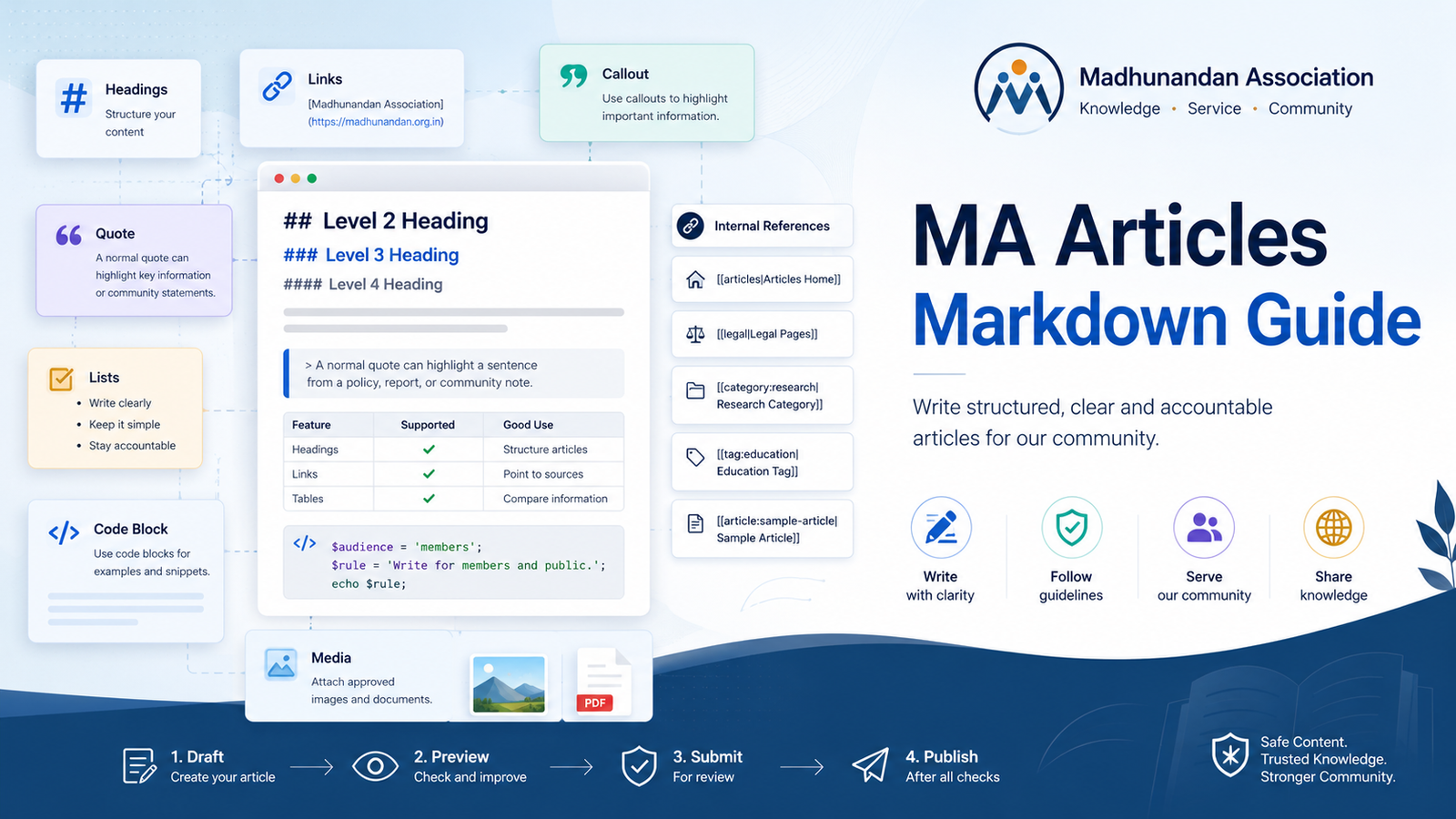
MA Articles Markdown Help
This article is a complete working guide for the Markdown format supported by MA Articles. It is written as normal article-body content for member training and future public knowledge use.
Use this guide when you want to write clear articles for Madhunandan Association without using raw HTML. The article title, slug, excerpt, cover image, category, tags, author display, visibility, and review status should still be managed from the article form.
Suggested Article Metadata
| Field | Suggested value | Notes |
|---|---|---|
| Title | MA Articles Markdown Help | Use the title field, not a # heading inside the body. |
| Category | Help or Knowledge | Use an admin-approved category. |
| Tags | markdown, help, articles | Tags should remain simple and searchable. |
| Public author | Organization or author display setting | Ownership still belongs to the real member or admin account. |
Quick Principles
Markdown is best when the article stays simple, readable, and accountable.
Use short sections, clear sources, and plain public language.
- Write for members and public readers.
- Keep private personal data out of public articles.
- Add sources, consent, and copyright details before publishing media or documents.
- Draft the article.
- Preview the article.
- Submit it for review.
- Publish only after the content, media, and legal checks are complete.
A normal quote can highlight a sentence from a policy, report, meeting note, or community statement.
Headings
MA Articles supports body headings from level 2 to level 4. The article title is handled separately by the system, so do not start the body with a level 1 heading.
Level 2 Heading
Use level 2 headings for major sections.
Level 3 Heading
Use level 3 headings for normal subsections.
Level 4 Heading
Use level 4 headings for compact details under a subsection.
Paragraphs and Soft Breaks
Separate paragraphs with a blank line.
This paragraph contains a soft line break
inside the same paragraph. Use this only when a line break helps readability, because normal paragraphs should usually wrap naturally.
Inline Formatting
You can use bold for emphasis, bold with underscores when useful, italic for light emphasis, italic with underscores, bold italic for strong emphasis, bold italic with underscores, and strikethrough when you need to show removed or outdated wording.
Use inline code for small technical values such as content_format, source_markdown, [[toc]], or media:1.
Escaped characters are supported when you want the symbol itself: *not italic*, [not a link], and `not code`.
Links
Supported links include safe public URLs, internal site paths, email links, and telephone links.
- Official site: Madhunandan Association
- Articles index: Articles
- Email contact: contact@madhunandan.org.in
- Telephone example: Call the office
Unsafe links such as script URLs are blocked by the parser and should not be used.
Internal References
Internal references create controlled links to known article, category, tag, and legal routes.
- Main article area: Articles Home
- Legal index: Legal Pages
- Privacy page: Privacy Policy
- Terms page: Terms of Use
- Cookie policy: Cookie Policy
- Category route: Research Category
- Tag route: Education Tag
- Article route: Sample Article Slug
Use internal references when the target belongs to the Madhunandan public website. Use normal links for approved external sources.
Tables
Tables are useful for article summaries, public reports, comparisons, timelines, and research notes.
| Markdown feature | Status | Good use |
|---|---|---|
| Headings | Supported | Structure long articles |
| Links | Supported | Point to sources and legal pages |
| Tables | Supported | Compare facts or timelines |
| Footnotes | Supported | Add short source notes |
| Media references | Supported | Attach approved article images |
Tables should stay compact. Very wide tables are harder to read on mobile.
Code Blocks
Use fenced code blocks for examples, snippets, templates, or technical notes. Code is shown as text and is not executed.
$audience = 'members';
$rule = 'Do not publish private personal data.';

if ($audience === 'members') {
    echo $rule;
}
Raw HTML is not supported as live article markup. If you need to show HTML as an example, place it inside a code block:
<p>This is only an example. It should not be used as article formatting.</p>Footnotes and Source Notes
Footnotes help keep research articles readable while still showing source notes.1 They are also useful when explaining legal or governance context without interrupting the main paragraph.2
Use short footnotes. Long source sections should be written as normal article sections.
Callouts
Callouts are special quoted blocks with an approved label. They are useful for guidance, warnings, research notes, and source accountability.
Definition Lists
Definition lists are useful for glossary terms, research terms, legal terms, and article-specific vocabulary.
- Article
- A public knowledge, update, research, or guidance page managed through MA Articles.
- Markdown
- A plain-text writing format that the server converts into safe article blocks.
- Pending revision
- A reviewed update draft for an already published article. The public article remains unchanged until approval.
- DPDP
- A privacy law context that reminds writers to minimize personal data and publish only what is necessary and lawful.
Abbreviations
Abbreviations can show a short explanation when they appear in the article. This guide defines MA, DPDP, CSR, and FAQ at the end of the article.
MA uses articles for education, service updates, research summaries, governance notes, and public knowledge. DPDP awareness is important when writing public articles. CSR and FAQ articles may also use the same Markdown format.
Media References
Article images must come from the article media upload flow. Upload the image first, confirm copyright/source and privacy/consent, then copy the approved media ID into the Markdown.
Replace 1 below with the actual approved image media ID before live publication.
Remote image URLs are not supported for member-authored Markdown in the current release. This keeps media accountable and reviewable.
Downloadable Resource Blocks
Downloadable files must also come from the article media/resource upload flow. Upload the document first, confirm source/copyright and privacy/consent, then use the resource token.
Replace 1 below with the actual approved downloadable resource media ID before live publication.
The download alias is also supported:
Article Review Checklist
Use this section before submitting or reviewing a Markdown article.
| Review area | What to confirm |
|---|---|
| Table of contents | Links generated from body headings |
| Inline formatting | Bold, italic, bold italic, strike, code, links, and abbreviations |
| Lists | One unordered list and one ordered list |
| Quote | One normal quote block |
| Callouts | Note, important, warning, research, and source blocks |
| Tables | Responsive table layout |
| Code | Escaped code block, not executable code |
| Footnotes | Generated source notes section |
| Glossary | Generated glossary index from definition-list terms |
| Media | Approved image figure if the media ID exists and is active |
| Resource | Approved download card if the media ID exists and is active |
Safe Publishing Reminder
Before publishing, confirm that the article does not reveal private personal data, confidential member information, copyrighted content without permission, or unverified sensitive claims.
Use the review workflow. Keep the audit trail meaningful. When in doubt, ask an admin or reviewer before publication.
Download the full article as MD text: